Staying up to date on the latest AI models is like trying to keep my house vacuumed in the height of my dog’s shedding season (a losing battle). New AI models drop practically every week, and it’s not exactly obvious which ones deserve a spot in your workflows. This guide is your cheat sheet, with every model you can automate on Zapier right now, sorted by provider.
If you just want to cut to the chase and find out which model you should be using for which task, that’s what AutomationBench is for. It’s Zapier’s own benchmark for how these models handle real, messy business workflows, so you can pick based on performance instead of hype.
Table of contents:
There are two ways to bring AI models into your automated workflows: through Zapier’s built-in AI step (AI by Zapier) or by using direct integrations with the provider.
-
AI by Zapier packages dozens of models from OpenAI, Anthropic, Google, and more into one step, with no separate account or token billing—you just pay in Zapier tasks.
-
Direct integrations connect straight to a provider’s own account instead, trading that simplicity for a wider lineup. Think legacy GPT or DeepSeek models, billed by token through your own API key.
Or, if you want to kick off workflows directly from your AI assistant, Zapier MCP lets you install Zapier in any MCP-compatible tool and start taking actions across 9,000+ tools straight from your chat window.
Build automations from wherever you work. Describe the outcome you want, and Zapier connects your tools, runs the steps, and stays on the job after you close the chat. Combine AI with reliable, deterministic automation across 9,000+ apps. Get started for free.
Which AI models can you use with AI by Zapier?
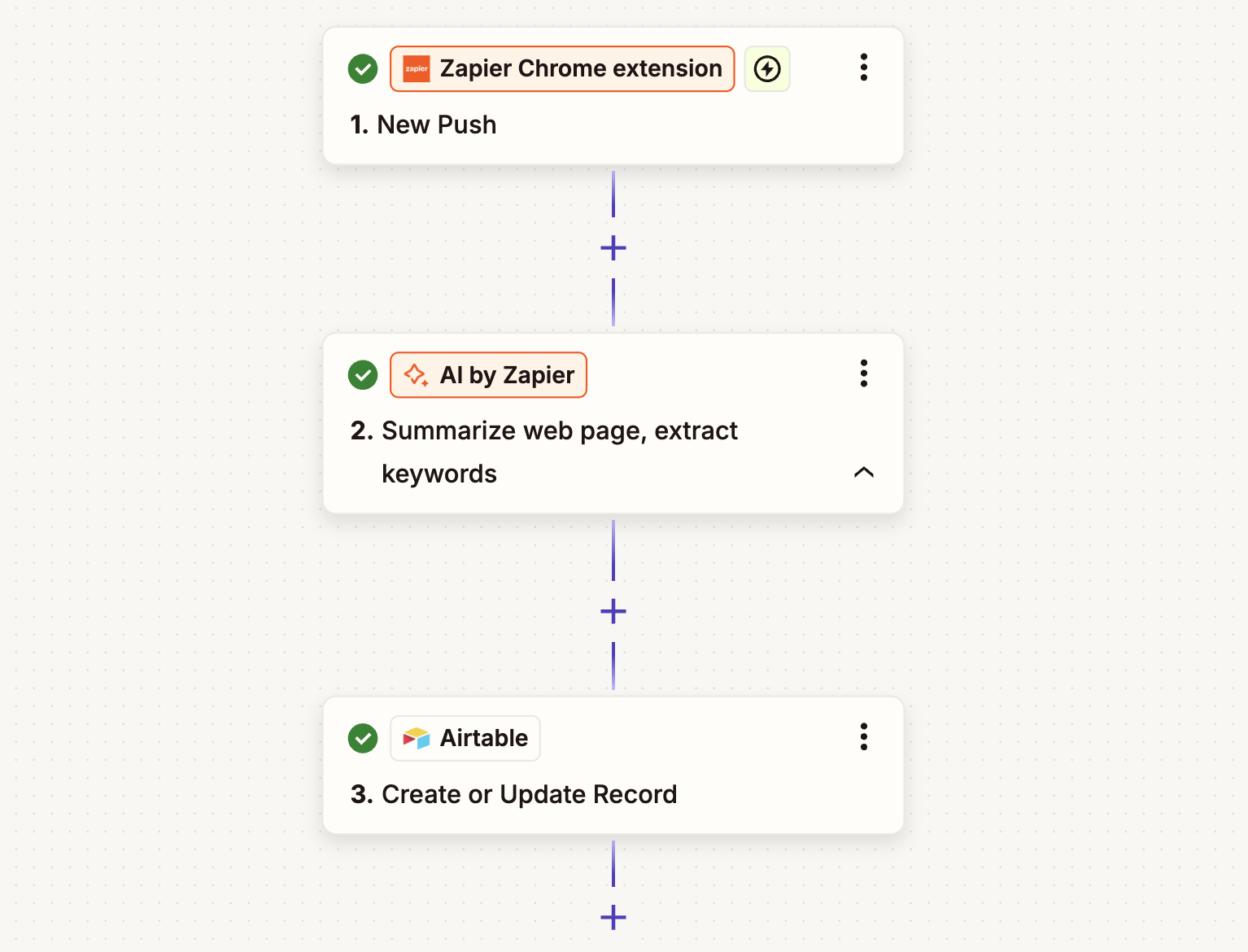
An AI by Zapier step is your best option for adding AI into deterministic workflows. You get access to roughly 35 models from OpenAI, Anthropic, Google, Moonshot AI, and Z.ai with no separate account and no token billing. Whichever model you choose, you get structured output fields, knowledge sources, agentic tool calling, prompt templates, and one-click model swapping.
You don’t even need a separate account to use these models—they’re built into Zapier, and you pay using Zapier tasks, not provider tokens. The models are sorted into task multiplier tiers based on the cost of the underlying model: Standard models use 1 task, Advanced models use 3 tasks, and Premium models use 5 tasks.
(If you prefer a model that isn’t included by default, you can also bring your own key [BYOK] for a wider set of options inside AI by Zapier—more on that below.)
OpenAI
Best for: General-purpose reasoning
OpenAI models are the broadest lineup on Zapier, spanning everything from ultra-cheap classification models to frontier reasoning models. GPT-6 Astra is a strong benchmark performer across the board on Zapier’s official AutomationBench leaderboard, making OpenAI the safest default when you’re not sure which model a workflow needs.
|
Model |
AI by Zapier |
|---|---|
|
GPT-4.1 nano |
1 task |
|
GPT-4.1 mini |
1 task |
|
GPT-4o mini |
1 task |
|
GPT-5 nano |
1 task |
|
GPT-5 mini |
1 task |
|
GPT-5.4 mini |
1 task |
|
GPT-5.4 nano |
1 task |
|
GPT-5.6 Luna |
1 task |
|
GPT-6 Luna |
1 task |
|
o3-mini |
3 tasks |
|
GPT-4.1 |
3 tasks |
|
GPT-4o |
5 tasks |
|
GPT-5 |
5 tasks |
|
GPT-5.2 |
5 tasks |
|
GPT-5.4 |
5 tasks |
|
GPT-5.6 Terra |
5 tasks |
|
GPT-5.6 Sol |
5 tasks |
|
GPT-6 Sol |
5 tasks |
|
o1 |
BYOK only |
|
o3 |
BYOK only |
|
o4-mini |
BYOK only |
|
GPT-5.5 |
BYOK only |
|
GPT-6 Astra |
BYOK only |
|
GPT-6.1 Sol |
BYOK only |
Anthropic
Best for: Coding and complex operations work
Claude is built to be careful and enterprise-safe, which is why companies like Slack, Notion, and Zoom have partnered with Anthropic directly. On Zapier’s official AutomationBench leaderboard, Claude Sonnet 5.5 ranks #3 overall, at $1.14 per task. I recommend reaching for Claude when a workflow needs careful multi-step judgment, not just speed.
|
Model |
AI by Zapier |
|---|---|
|
Claude 4.5 Haiku |
3 tasks |
|
Claude 4.5 Sonnet |
5 tasks |
|
Claude 4.5 Opus |
5 tasks |
|
Claude 4.6 Sonnet |
5 tasks |
|
Claude 4.6 Opus |
5 tasks |
|
Claude 4.7 Opus |
5 tasks |
|
Claude 4.8 Opus |
5 tasks |
|
Claude 5 Opus |
5 tasks |
|
Claude 5.5 Opus |
5 tasks |
|
Claude 5 Sonnet |
5 tasks |
|
Claude 5.5 Sonnet |
5 tasks |
|
Claude Fable 5 |
BYOK only |
|
Claude Fable 5.1 |
BYOK only |
|
Claude 4.0 Sonnet |
BYOK only |
|
Claude 4.0 Opus |
BYOK only |
|
Claude 4.1 Opus |
BYOK only |
|
Claude 5.5 Haiku |
BYOK only |
Best for: High-volume workflows
Gemini models offer some of the lowest per-task costs on Zapier—while still competing with the other state-of-the-art models on power. That makes Gemini the default choice when you’re processing a lot of content and cost is the priority. Google’s newest model, Gemini 4 Argon, held the top two spots on Zapier’s official AutomationBench leaderboard when it launched, though at a higher cost per task.
|
Model |
AI by Zapier |
|---|---|
|
Gemini 2.5 Flash |
1 task |
|
Gemini 2.5 Flash Lite |
1 task |
|
Gemini 3.5 Flash Lite |
1 task |
|
Gemini 3.5 Flash |
3 tasks |
|
Gemini 3.6 Flash |
3 tasks |
|
Gemini 3.7 Flash |
3 tasks |
|
Gemini 3.8 Flash |
3 tasks |
|
Gemini 2.5 Pro |
3 tasks |
|
Gemini 3.1 Pro |
5 tasks |
Moonshot AI
Best for: Tool-heavy, agentic workflows
Kimi (from MoonshotAI) is a mixture-of-experts model purpose-built for tool use and multi-step agent tasks, priced well below most proprietary frontier models. Kimi K3 currently ranks #33 overall on Zapier’s official AutomationBench leaderboard, at a fraction of the cost of most proprietary frontier models ($0.43 per task).
|
Model |
AI by Zapier |
|---|---|
|
Kimi K3 |
5 tasks |
Z.ai
Best for: Cost-efficient agentic tasks
Z.ai’s GLM family is priced well below proprietary frontier models, which makes it a solid pick for straightforward, lower-stakes automation. GLM 5.2 lands at #87 on the official AutomationBench leaderboard—behind Kimi and the frontier proprietary models—so it’s a better fit for straightforward, lower-stakes automation than complex, multi-step work. At $0.22 per task, it’s one of the cheapest options on the board either way.
|
Model |
AI by Zapier |
|---|---|
|
GLM 5.3 Fast |
1 task |
|
GLM 5.3 |
3 tasks |
Meta
Best for: Long-context tasks
Meta’s Muse Spark models are the Facebook parent company’s response to OpenAI, Anthropic, and Google Gemini. Muse Spark 1.3 is designed to keep track of requirements as users change direction or go between projects. It also emphasizes efficient tool use and multimodal understanding, which helps it work through complex coding and real-world tasks with fewer unnecessary steps.
|
Model |
AI by Zapier |
|---|---|
|
Muse Spark 1.3 |
3 tasks |
DeepSeek
DeepSeek is a cost-efficient open-weight model with strong coding and reasoning chops, popular for technical workflows on a budget.
|
Model |
AI by Zapier |
|---|---|
|
DeepSeek V4.1 Flash |
1 task |
Amazon Bedrock
Teams already running infrastructure in AWS often pick Bedrock so AI automation stays inside the security and compliance boundary their IT team has already vetted, with usage tracked under existing AWS access controls and spend commitments instead of a new vendor relationship.
Bedrock uses the AI models your company has already set up in Amazon Bedrock. The exact models depend on what’s enabled in your AWS account and region.
Azure OpenAI
Azure OpenAI is a common pick for regulated industries because it wraps the same underlying models in Microsoft’s enterprise-grade security and compliance certifications, so your data stays inside your company’s private Azure tenant instead of routing through a separate AI vendor.
Azure uses the AI models you’ve already set up in your own Azure OpenAI account. The exact models depend on what your Azure admin has turned on.
When should I use BYOK?
If you want to use a model that isn’t built into AI by Zapier, you can also bring your own key (BYOK) for your preferred model. All of the models listed above can be used with BYOK—and some require it.
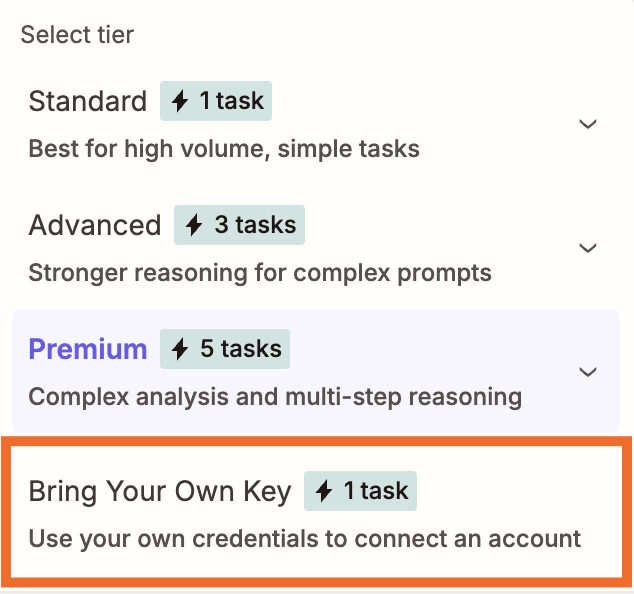
With BYOK, you’ll use your own API key and pay the provider directly for tokens. If you don’t know what that means, just pick one of the built-in models and move on. But if you’re considering BYOK, these are the main benefits:
-
Cost control on tool-heavy workflows. BYOK runs at a 1x task multiplier even when a step makes multiple tool calls, compared to 3x on built-in Advanced models or 5x on built-in Premium models. A BYOK step with 4 tool calls would cost 5 Zapier tasks (1 for the BYOK, 1 for each tool call), while the same workflow on Premium would cost 25 (5 for the BYOK, 5 for each tool call).
-
Access to models that aren’t in the default lineup, including newer models like GPT-6 Astra, Claude Fable 5.1, and Gemini 3.1 Pro, and legacy models like o1, o3, and GPT-5.5.
-
Control over content moderation. You can also turn off Zapier’s built-in content moderation with BYOK, since the provider’s own data-handling terms take over once you’re paying with your own key.
Which AI models can you use on Zapier via direct integrations?
Instead of using AI by Zapier, you can also connect directly to your AI provider through its Zapier integration.
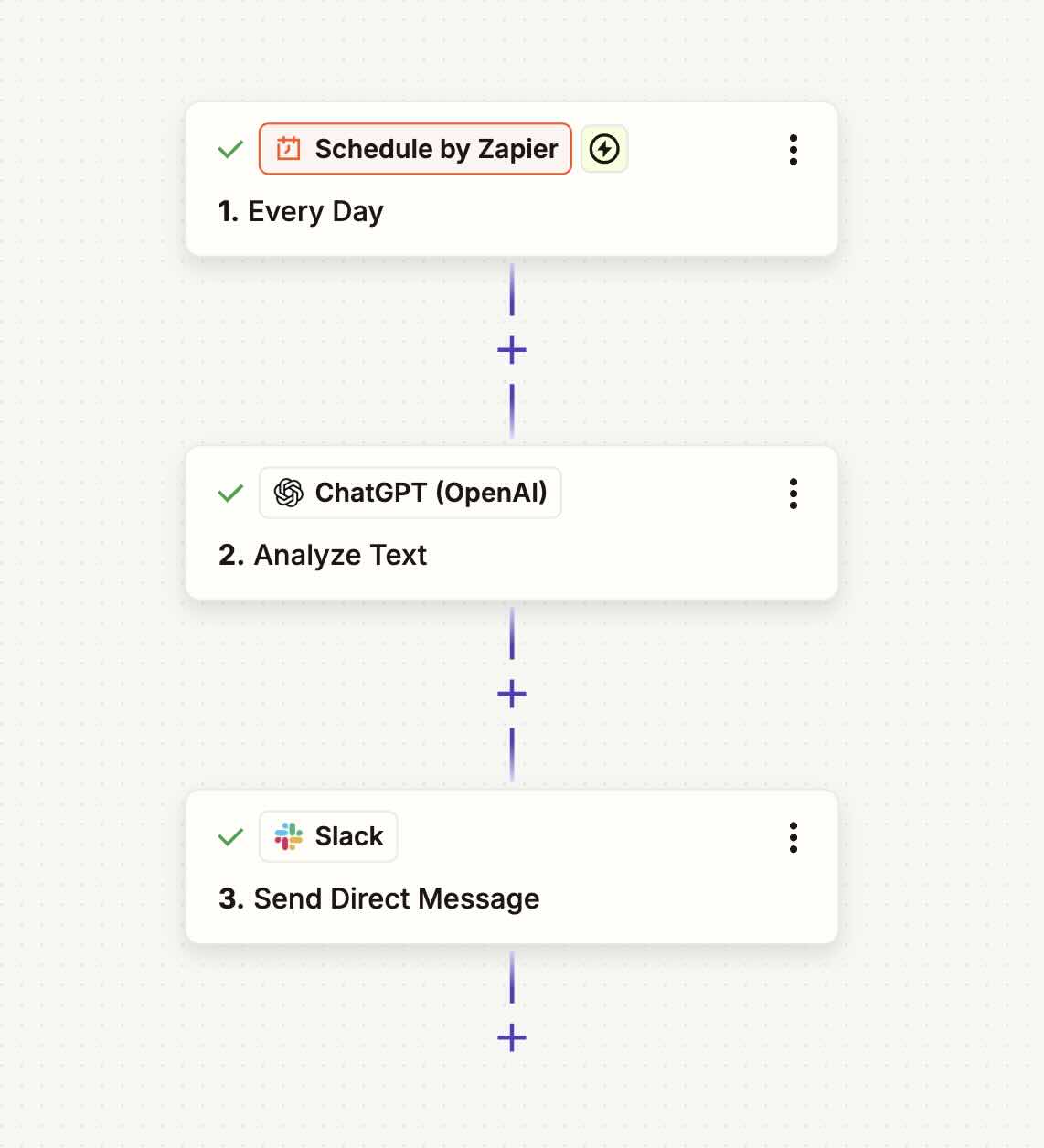
I recommend trying AI by Zapier first, since direct integrations give you less flexibility inside the Zap editor. Both a direct integration and a BYOK step require you to use your own API key, but BYOK steps within AI by Zapier benefit from advanced features like structured outputs and knowledge sources. And when you BYOK, you can swap out a provider without rebuilding the whole step from scratch.
Like with BYOK, you’ll pay the provider directly, based on token usage, so your costs can vary a lot more than AI by Zapier’s straightforward task-based billing. But these integrations do open the door to more niche providers and legacy models. For example, you can access older OpenAI models still available through the API or more open-weight providers like DeepSeek.
You can visit Zapier’s app directory to see all of your options, but here are the most popular:
-
OpenAI (ChatGPT)—access legacy models like GPT-4, GPT-4 Turbo, and GPT-5.4 Thinking
-
Grok by xAI—xAI’s conversational model, with real-time access to web and X data and a more irreverent tone than most assistants
-
Mistral AI—Models with strong instruction-following and multilingual performance, ranging from fast lightweight options to larger frontier models
-
OpenRouter—A single integration that gives you access to models from dozens of providers, so you can mix and match without managing multiple connections
-
Groq—Not a model, but a hardware-accelerated inference engine for when speed is the priority and you need a near-instant response
-
AssemblyAI—Specializes in speech-to-text and audio intelligence, including transcription, speaker detection, and sentiment analysis
Or bring your AI agent to the automation instead
Everything above is about picking a model inside a Zap. But if you’re already living inside an AI agent harness, like Claude, ChatGPT, or Cursor, you don’t need to leave it to get things done. Zapier MCP connects your agent directly to 9,000+ apps, so it can send a Slack message, update a CRM record, or kick off an entire workflow without you switching tabs.
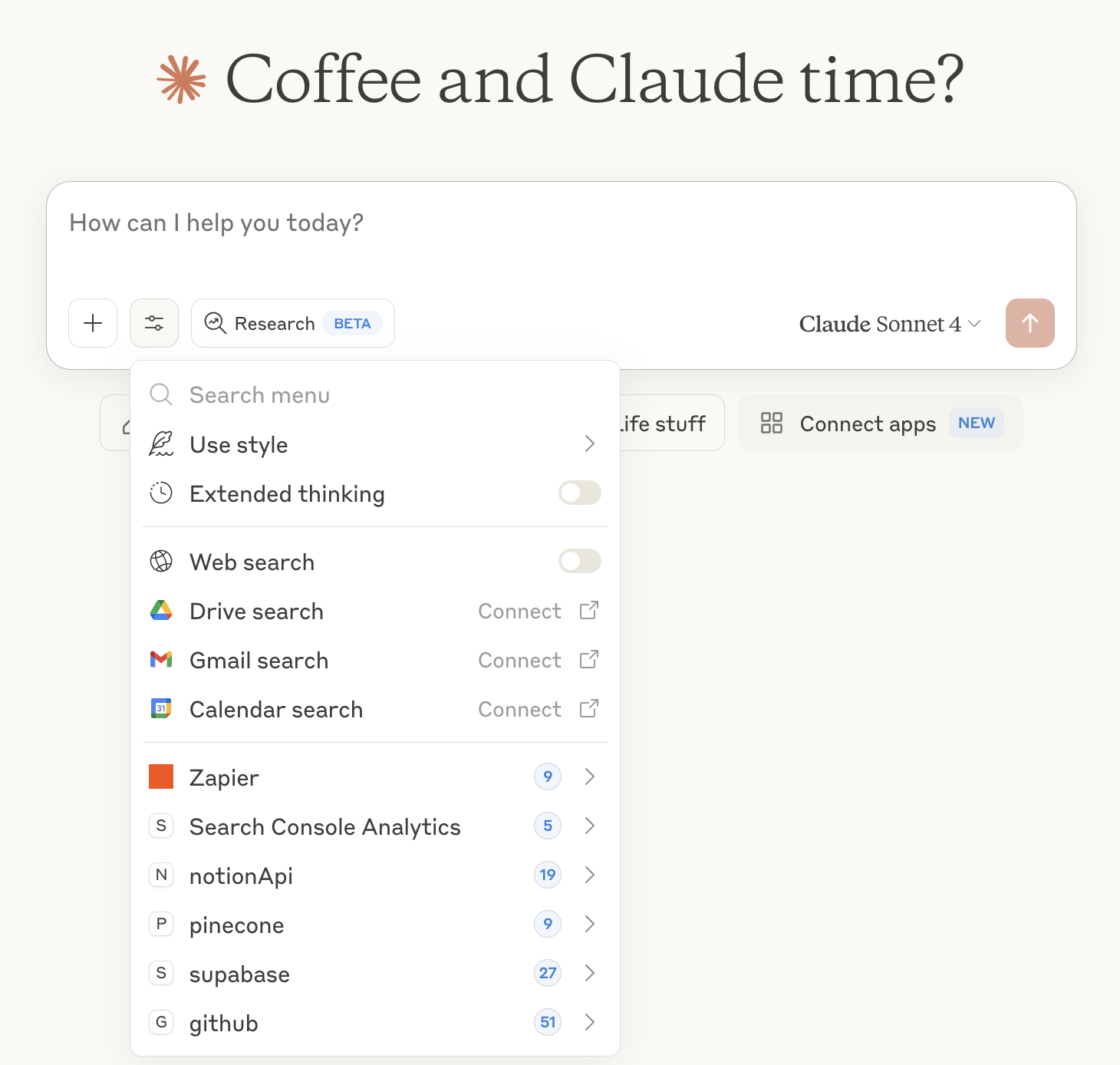
If your team already has a favorite AI agent, Zapier MCP is how you bring your whole tech stack to meet it. Learn more about Zapier MCP.
Pick the best AI model for the job
Whether you’re just getting started with AI automation or you’re deep into building multi-step workflows, Zapier gives you the flexibility to use the AI tools and models that actually fit your needs. The landscape keeps evolving, and so will this guide. Bookmark it and check back whenever a new model drops.
Still not sure which model to reach for? Check AutomationBench to see how real models perform on real business workflows, not just clean prompts.
This article was originally published in March 2026 by Steph Spector. The most recent update was in October 2026.