
By Adam Hughes · November 11, 2026

As a small business owner running multiple newsletters, I’m always hunting for ways to claw back a few hours. So my ears perked up when I first heard Lindy AI’s pitch that it could save me time.
Of course, I had questions: namely, how much does it actually cost to save me that time? I dug in, and here’s what you need to know about Lindy’s plans, credits, hidden costs, and how it stacks up against Zapier before you commit.
Table of contents:
What is Lindy?
Lindy is an AI work assistant that handles repetitive work tasks over Slack, email, and text. It can automate tasks like drafting and filing emails, running and analyzing reports, and triaging customer support tickets.
Lindy drafts replies in your voice (or at least, like a version of you that’s slightly more professional and way less likely to end an email with “sorry for the novel lol”), and it can record meetings and take notes.
Proactivity is what sets it apart. Lindy handles meeting prep and follow-up, sends daily briefs and nudges, and integrates with more than 3,000 tools.
Lindy pricing overview
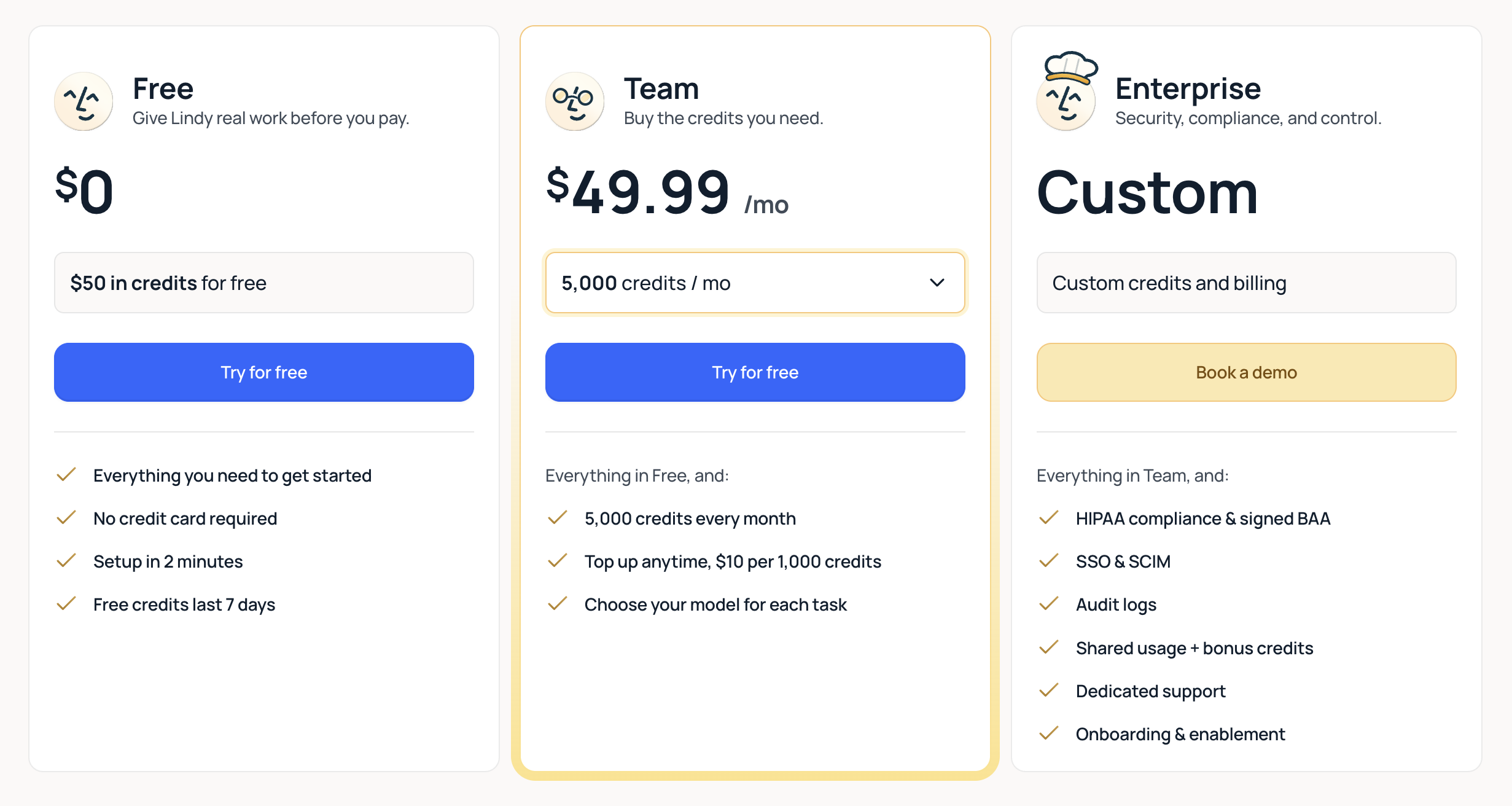
Lindy’s pricing starts with a limited-time free plan: $50 in credits, no credit card required, and it lasts 7 days. After that, you pay per seat for a monthly pool of credits, and you pick the size of the pool. Those plans aren’t cheap, and the price climbs quickly as you add credits.
Team pricing
Lindy’s paid plan is called Team, and you choose how many credits you want each month. Prices start at $29.99/user/month for 3,000 credits.
If you need more room, Lindy’s Team plan has bigger credit tiers.
-
The 5,000-credit tier costs $49.99/month
-
The 15,000-credit tier costs $99.99/month
-
The 35,000-credit tier is $199.99/month
Tiers keep going from there, topping out at 1,750,000 credits for $9,999.50 per month, so there’s room to grow if you’re managing multiple projects or businesses.
Every tier includes the core features: inbox management, meeting scheduling and prep, and more than 3,000 integrations. You can connect 2 to 5 inboxes depending on your plan, which is plenty if you’re a normal person with a work email and a personal email.
Enterprise pricing
The Enterprise plan transitions Lindy from a personal assistant to an organizational tool. This tier focuses on security, scale, and administrative control, with features like SSO, SCIM, audit logs, and HIPAA compliance with a signed BAA to keep everything above board. Organizations also get dedicated support, onboarding and enablement, shared usage with bonus credits, and custom credits and billing.
Lindy doesn’t publish its Enterprise pricing, so you’ll have to contact the sales team for the full scoop, which means you’re gonna get a demo invite, which means you’re gonna have to sit through a sales pitch, which means you’re gonna lose an hour of your life that you will never get back.
Additional credit pricing
Instead of charging a flat fee per action, Lindy uses a usage-based system where the work you ask for consumes credits, and bigger jobs use more. Lindy groups tasks into three rough sizes: everyday asks like summaries, lookups, and drafting a reply cost 2-250 credits; deep work like competitor research reports or triaging a support queue cost 250-1,000 credits; and big builds like complex dashboards or internal tools cost 1,000-2,500 credits.
Each plan comes with a set number of credits per month, and unused monthly credits don’t roll over. Once they’re gone, Lindy doesn’t bill you for overages. It pauses credit-using actions until your credits reset, or until you top up. Top-ups are $10 per 1,000 credits, and purchased top-up credits don’t expire. Lindy’s docs also put the cost of a credit at $0.01 on base plans. (Still a good incentive to keep an eye on usage.)
Lindy says it will tell you when the credit pool runs low, which is nice in a “your bank account is about to be overdrawn, just FYI” kind of way. And admins can set credit allocations per seat so no one person burns through the lot,
Who is Lindy best for?
Lindy is ideal for solopreneurs and small business owners whose time is better spent closing deals or building products than wiring up complex integrations.
In fact, Lindy’s core promise is that it can take over administrative work—email, meeting setup, research, and all the day-to-day stuff that eats up your time. And it does this at a fraction of the cost of hiring and training a new employee.
Lindy doesn’t fit as neatly in larger businesses with more exacting reporting structures and communication standards. Bigger companies are more likely to stick with human assistants for now (because humans, for all their flaws, are at least predictable in their unpredictability). Though Lindy is trying to change that with its Enterprise tier.
Lindy is also probably not the best fit for companies that rely on repeatable, traceable processes that work the same way every time. For example, if you need to import customer information from your CRM into your data warehouse every night, you want to be certain that the integration is rock-solid.
Zapier offers more flexibility: it lets you monitor and control every step of each workflow, add AI into the mix at any point, and work directly from your favorite AI tools with Zapier MCP.
Lindy vs. Zapier pricing
Just as they serve different business needs, Lindy and Zapier use different pricing models. Lindy’s free plan only lasts seven days (and it gives you $50 in credits); paid plans start at $29.99/user/month and scale with credits, making it affordable for most simple tasks but potentially expensive as your workload and task complexity grow.
Zapier offers a free forever plan, and its paid plans start at $19.99/month (about a third less than Lindy’s cheapest plan). Zapier’s pricing is task-based, where each action in a workflow counts as one task. Step up to a Team plan, and you’ll get 2,000 tasks per month and up to 25 users for $69/month. That’s $69/month total, not per user. And for big organizations, enterprise pricing is available.
The big advantage Zapier has—besides the lower price points—is connectivity. Zapier offers more than 9,000 integrations and handles all API updates and connector maintenance. If secure automation and AI connectivity with nearly any app you can name are what you need, Zapier is the clear choice.
Related reading:
This article was originally published in June 2026. The most recent update was in November 2026.
Get AI and automation tips, delivered straight to your inbox
We’ll email you 1-2 times per week—and never share your information.
Related articles




Your agent builds it. Zapier keeps it running. Build automations across 10,000+ apps.