
By Ritu Pandey · November 11, 2026

The first time someone at a Microsoft shop notices their Power Automate bill is higher than expected, they usually look for a pricing page. What they find is a grid with three plans, a $5,000/month add-on that isn’t a typo, and the slow realization that the free tier they’ve been using doesn’t include the connectors they actually need.
Microsoft offers a few different plans, each built for a different use case, layered on top of whatever you’re already paying for 365. It’s worth untangling before you commit to anything.
I’ve broken down every current plan: what’s included, what it costs, and who it’s actually built for, so you can figure out if Power Automate fits your org, or whether there’s a better option for what you’re trying to do.
Table of contents:
What is Power Automate?
Microsoft Power Automate is a workflow automation tool that lives inside the Microsoft ecosystem. Move data between SharePoint and Teams, trigger emails from Outlook, automate approvals in Dynamics 365; that’s the core of it. It also supports robotic process automation (RPA) via desktop flows, enabling you to automate tasks in legacy apps that don’t have APIs and probably never will.
If your org is already running Microsoft 365, there’s an obvious pull here. Some basic automation is already baked into your existing license: standard connectors, basic cloud flows, nothing too heavy. But that tier has a ceiling. The moment you need premium connectors, desktop flows, or anything more than simple task automation, you’re into paid territory. The baseline isn’t really zero; it’s whatever you’re already paying Microsoft.
For teams that work across a wider app stack, not just Microsoft tools, Power Automate doesn’t have to be the default choice. Zapier connects to 9,000+ apps, including Microsoft software, and works regardless of which ecosystem your org runs on.
Power Automate pricing overview
Microsoft Power Automate pricing breaks into three main plans, plus a Process Mining add-on. Each is built around a different type of automation user.
Microsoft 365 inclusion
Before you pay for anything, it’s worth knowing what you already have. Microsoft 365 plans come with limited Power Automate use rights at no extra cost. If your org already runs on Microsoft 365, your users can build automations today without buying a separate plan.
What’s covered is cloud flows that use standard connectors only. That includes the Microsoft apps your team probably already lives in, like Outlook, SharePoint, Teams, OneDrive, Excel, Forms, and Planner, plus some popular non-Microsoft apps like Slack, Gmail, Dropbox, and Trello. That’s enough to handle a lot of internal busywork like routing an approval or posting a Teams message when a SharePoint list updates.
But the moment a flow needs to reach outside the Microsoft ecosystem—Salesforce, SAP, ServiceNow, SQL Server, or anything that requires a premium connector—the seeded license stops working and you’re into paid territory. Desktop flows (RPA) and AI Builder aren’t included either, and the included plan has daily action limits, so high-volume automation will hit a ceiling. This trips up more teams than any other part of Power Automate licensing.
Premium plan
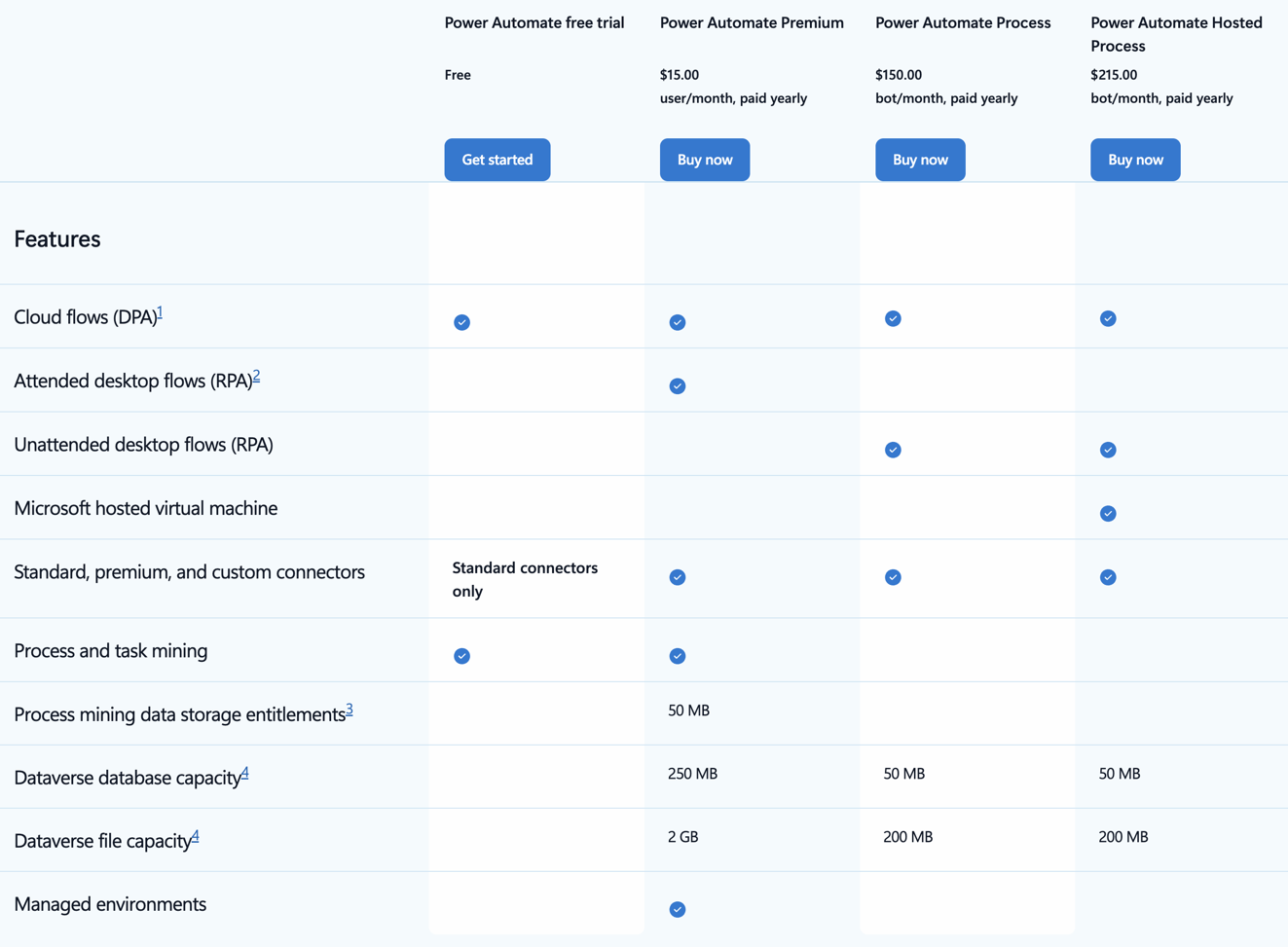
Power Automate Premium costs $15 per user per month, billed annually. It’s the entry point for teams that need more than what comes bundled with Microsoft 365.
The Premium plan covers cloud flows (digital process automation) with standard, premium, and custom connectors, attended desktop flows (RPA with a human present), and process and task mining with 50 MB of data storage. It also includes Microsoft Dataverse entitlements, which matters if you’re running Power Apps alongside Power Automate.
There’s a 30-day free trial available, which gives you access to cloud flows and standard connectors to test the basics before committing.
One thing to flag: the Power Automate Premium license is per-user. For small teams, that’s manageable. For larger orgs rolling this out across departments, the per-seat model adds up quickly—especially when you factor in that not everyone needs the same level of access.
Process plan
The Process plan costs $150 per bot per month, billed annually. It’s built for unattended automation—workflows that run in the background without a human in the loop. It’s priced per bot rather than per user, which makes it a different model entirely from Premium. Each bot runs one unattended flow at a time.
This plan includes unattended desktop flows (RPA that runs without human interaction), cloud flows, and Dataverse entitlements. It’s the right plan if you’re automating back-office processes, data migration, system integrations, and scheduled batch jobs, where no one needs to be at a keyboard to watch them run.
Because it’s process-based rather than user-based, it can be more cost-effective for high-volume automation that runs on a set schedule. But it requires more technical setup than the Premium plan, and it’s not the right starting point for teams new to RPA.
Hosted Process plan
The Hosted Process plan adds cloud-hosted infrastructure to the Process plan for $215 per bot per month, billed annually. Instead of running desktop flows on your own machines or VMs, you get a Microsoft-hosted virtual machine on Azure infrastructure.
This is the plan for orgs that want the power of unattended RPA without managing their own infrastructure. The tradeoff is cost; hosted infrastructure comes at a premium over the standard Process plan. It’s a clean integration for teams already running Azure or other Microsoft cloud services, but it does add another layer of vendor dependency.
Process Mining add-on
Process Mining is an add-on available only with the Power Automate Premium plan, priced at $5,000 per tenant per month, billed annually. That’s not a typo. It’s an enterprise-tier product with enterprise-tier pricing: 100 GB of data storage, 2 GB Dataverse database entitlements, and 1 TB file capacity.
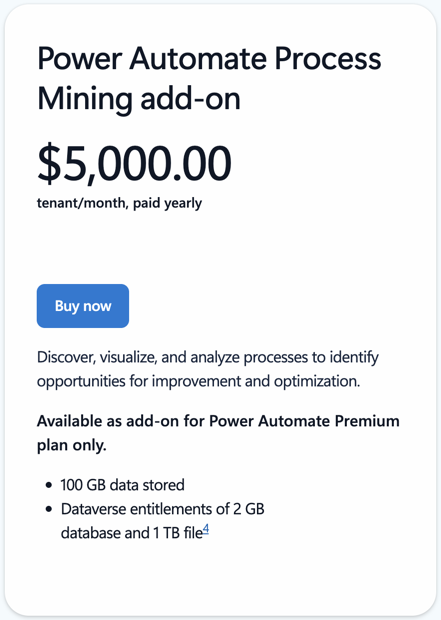
It lets you discover, visualize, and analyze your business processes before you automate them, which helps you identify where the actual bottlenecks are rather than guessing. It’s clearly something people are willing to pay for—think large orgs with complex, multi-step processes—but you’ll need a solid ROI case before you jump on.
Who is Power Automate best for?
Power Automate is built for organizations that are already committed to Microsoft. If your team lives in Teams, SharePoint, Outlook, and Dynamics 365, it slots in perfectly: native connectors, data that stays in Microsoft’s infrastructure, and licensing that can roll into existing Microsoft 365 agreements.
It’s also a solid fit for orgs that need RPA. Automating desktop applications and legacy systems without modern APIs is hard, and Power Automate’s desktop flows capability handles it without requiring a dedicated RPA platform.
The harder question is what happens outside the Microsoft bubble.
The Microsoft Power Automate pricing model assumes Microsoft 365 is already in the budget. Per-user costs compound quickly when you’re rolling out automation across a mixed-tool environment, and premium connectors for apps like Salesforce, SAP, or ServiceNow require the paid plan. That changes the math pretty quickly.
If you want automation to scale across your entire organization—not just the Microsoft corner of it—Zapier is the better choice.
Power Automate vs. Zapier pricing
Comparing Microsoft Power Automate pricing to Zapier isn’t apples-to-apples. There are different pricing models and different assumptions about how your team works.
Power Automate Premium is $15 per user per month. Run that on a 20-person team, and you’re at $300/month before add-ons. That’s also assuming everyone needs the same plan, which rarely happens in practice. And sure, it has a 30-day free trial, but Zapier has an entirely free plan.
Zapier prices on tasks, not seats. You pay for what actually gets automated: non-work steps, like filters, paths, and triggers, don’t count against your limit. That means as workflows get more complex, the cost doesn’t automatically increase. Teams can add conditional logic without second-guessing whether it’ll spike the bill at the end of the month.
You also have to consider how integrations are packaged. With Power Automate, premium connectors require a paid license, while Zapier’s 9,000+ integrations are all included on every paid plan.
So if you’re a Microsoft-first org automating mostly within Microsoft tools, Power Automate might hold up on price. But if your stack is mixed or you’re trying to get automation working across teams using different tools, the per-seat model and connector restrictions can end up costing more, and you’re better off using Zapier.
Read more: Zapier vs. Power Automate
Related reading:
This article was originally published in June 2026. The most recent update was in November 2026.
Get AI and automation tips, delivered straight to your inbox
We’ll email you 1-2 times per week—and never share your information.
Related articles





Your agent builds it. Zapier keeps it running. Build automations across 10,000+ apps.