

There are too many messaging apps. Meta alone has three: Messenger, WhatsApp, and Instagram. Throw in regular texting like SMS and iMessage, secure apps like Signal, work apps like Slack, and even offbeat options like Discord and X, and the situation just gets silly. But what if you just had one app where you could message your friends, family, work colleagues, and everyone else? That’s what Beeper is: an all-in-one universal (or at least near-universal) messaging app.
And to skip to the conclusion: it’s the only app in its category, it’s absolutely killing it, and I use it daily on both my Mac and iPhone. I’ve stopped using the default WhatsApp and Instagram accounts as a result.
Strangely, all-in-one messaging apps used to be a much larger thing. In the late 2000s, apps like Adium and Pidgin supported a variety of protocols, including XMPP, IRC, and Bonjour, that were used by major services, like Google Talk and iChat, as well as supporting other messaging platforms, like AOL Instant Messaging (AIM). It was kind of a golden age of interoperability—but it all came to an end with the rise of proprietary messaging services like iMessage, WhatsApp, and Facebook Messenger.
Admittedly, the proprietary apps were easier to set up and much nicer to use—especially on suddenly-everywhere smartphones—but they also lacked the convenience of having an all-in-one do-anything chat-to-anyone messaging app.
Beeper is the one unified messaging app that’s made a comeback. And while it looked like we might get more due to a few technology changes, more widely available web apps, and a little bit of EU law-making, it doesn’t seem like we’re entering a new era of messaging app interoperability.
Usually, I have to do in-depth testing on dozens of apps to make a list like this. But this one was much easier: Beeper is your best option (but at least it’s great). Maybe next year I’ll have more apps to recommend.
(If you can’t tell from today’s little history lesson, I’ve been using messaging tools since texts cost $0.10 a pop. I’ve also been writing about online communication tools for more than a decade. This is something I care a lot about, and I’m really hoping that the good ol’ days might be coming back around.)
The best unified messaging apps
-
Beeper for the best universal texting app
What makes a great universal texting app?
Universal texting apps are very easy to get wrong. There’s no point just cramming a few different web apps into a bad user interface and calling it an all-in-one messaging app. Sure, it saves you using your browser to go to the web apps or swapping between different apps on your smartphone, but the experience isn’t exactly better—and it’s certainly not what I was looking for here.
Instead, I was looking for universal texting apps that:
-
Connect multiple popular messaging services from different companies together into one tool. So, no apps that just link Meta’s three messaging apps, for example, and sadly no Adium, which still technically exists but doesn’t work with the biggest messaging platforms.
-
Have a universal inbox. All your messages should appear in one unified inbox, regardless of what platform you received them from. Finding apps that met this criteria was the biggest challenge, as lots of apps that claim to be universal texting apps really just allow you to see messages from different services in their own tabs—not all at once.
-
Have notifications for every service—and give you some kind of control over them. When you’re at work, you might want to see Slack messages from your colleagues, but you also need to be able to mute the WhatsApp group chat that keeps going off.
-
Are nice to use. Maybe I have a rose-tinted view of the previous generation of universal chat apps, but that doesn’t mean you should be stuck using an ugly, bad app now. I was looking for nice interfaces, things like keyboard shortcuts, and a generally modern, high quality user experience.
-
Are security conscious. Any time you add a middleman into a communication protocol, you’re adding an extra source of vulnerabilities. While sticking to a highly secure messaging app is always going to be the safest option, universal messaging apps add a lot of convenience. At the very least, each app had to acknowledge this trade-off and explain what they were doing to mitigate it. If you’re planning to whistleblow on an authoritarian government, I wouldn’t recommend the apps on this list, but most people should be able to use them comfortably.
To test the available apps, I simply used them. I send somewhere between 50 and 5,000 messages a day, so I just logged in with a few of my accounts and tried to keep in contact with my friends and colleagues.
As you’ll see from the list, only Beeper met my (admittedly demanding) criteria for inclusion. But it’s good enough to warrant its place on a best apps list. I use it daily, which is about the strongest praise I can give.
The best all-in-one messaging app
Beeper (Windows, macOS, Linux, iOS, Android)
Beeper pros:
-
Decent free plan
-
Has mobile versions
Beeper cons:
-
Combining every messaging profile isn’t the most seamless process
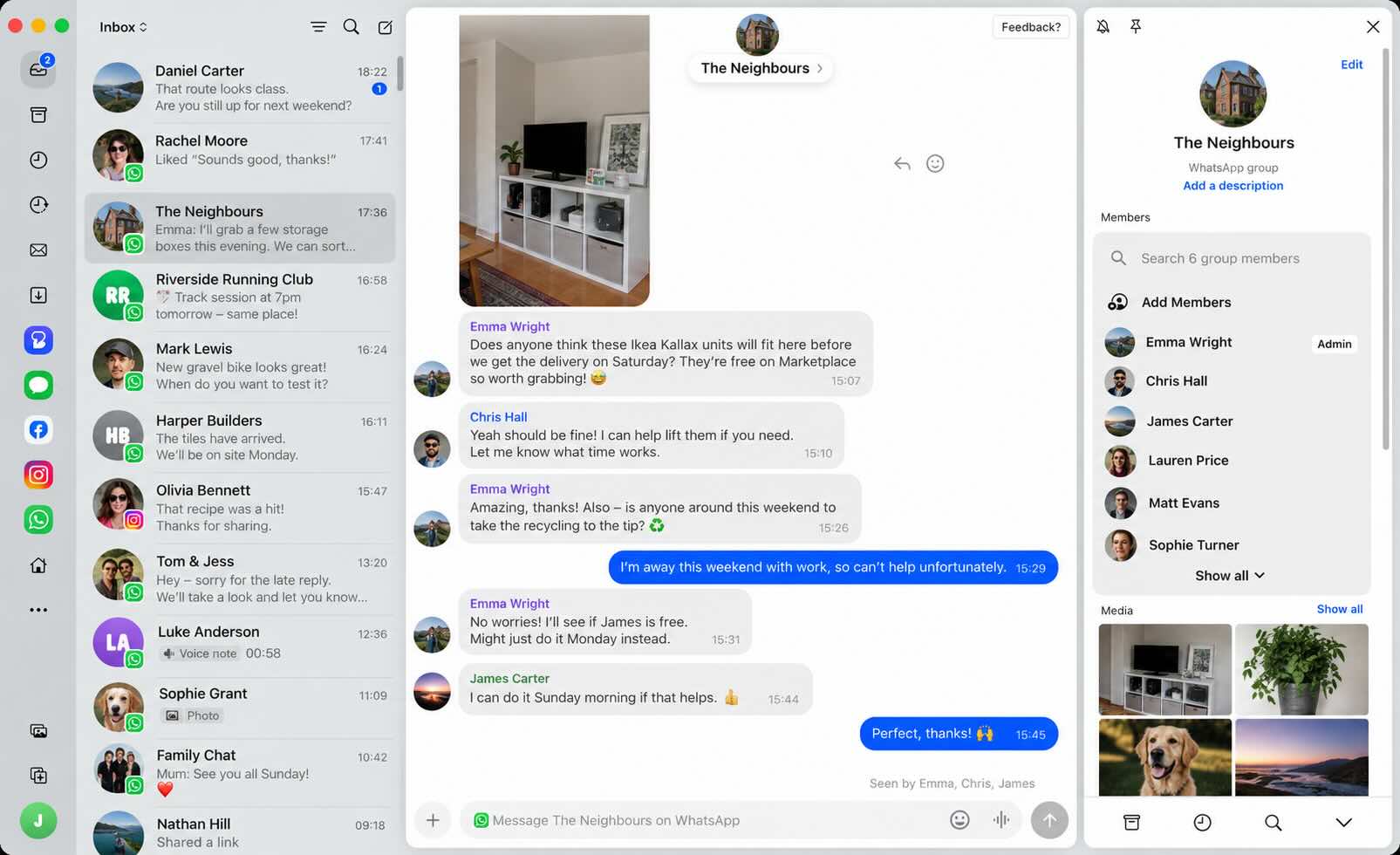
Beeper is the best (and only true) unified messaging app. In a somewhat ironic twist, the current version of Beeper is really the unification of Beeper and the other good universal messaging app, Texts, that got shut down last year. Both were bought by Automattic, and the teams have done a great job of merging the best features of both apps.
Beeper currently supports WhatsApp, Facebook Messenger, Instagram, X, Telegram, Signal, Google Chat, Google Messages, Google Voice, Slack, IRC, Discord, LINE, Tumblr, LinkedIn, Matrix (an interoperable messaging app protocol), and Viber. Years after generating headlines trying to bring iMessage to Android, it has support for iMessage—but only on macOS.
Beeper offers a great messaging experience on both desktop and mobile devices. The unified inbox keeps all your messages in one place, search works across all your chats and services (and is super quick and accurate), and you get powerful and granular notification control. If you only want notifications from one-to-one chats or never want to see messages from a group you can’t leave for political reasons, Beeper makes it possible. You can schedule messages, combine chats with the same person on different platforms into one, and send audio notes and images. It’s fast, nice-looking, easy-to-use, and works securely across desktop and mobile apps, and your different services.
Occasionally you’ll find features that aren’t supported. If you get a WhatsApp call, it sends you to the official WhatsApp to answer. I love that I can see the crap my friends send me on Instagram without having to open Instagram, but the way posts and reels are embedded is a lot jankier and shows that some things are still a bit hacked together. The team is actively shipping new features all the time and things keep improving, but you can’t hide from the fact that WhatsApp, Tumblr, and Slack are wildly different platforms with totally different feature sets.
Beeper is free for up to five accounts, though you can only have one per platform. Beeper Plus starts at $9.99/month and includes up to three accounts from the same network, scheduling messages, and an incognito mode that lets you see messages without sending a read receipt. If you’ve previously used Beeper or Texts, you’ll get some extra features; as an early user of Beeper, for example, I get 10 accounts for free.
If you send a lot of messages or have a lot of different messaging channels, Beeper is incredibly helpful. My two favorite things are that I can blitz through messages on my Mac instead of my iPhone and that I can reply to Instagram messages without ever having to open the app with its all too doomscrollable feed. Since it’s free to get started, it’s hard not to recommend giving it a look if it in any way appeals to you.
Quick note: the screenshot above is real, but it’s been anonymized by ChatGPT. It’s changed the names and images but kept everything else the same. I just wanted to be sure you could see what it actually looks like without a bunch of blurs to keep my information private.
Beeper pricing: Free for up to 5 accounts; from $9.99/month for up to 10 accounts, support for multiple accounts from the same network, and other features.
What happened to Texts?
Automattic, the maker of WordPress, acquired both Texts and Beeper over a couple of months in late 2023 and early 2024. The two apps were both supported for a while, but the plan was always to merge them. Kishan Bagaria, the founder of Texts, is now the CEO of Beeper, and the Beeper app is actually based on the old Texts app.
If you’re still using Texts, switching to Beeper is easy. As a former Texts user, I feel right at home (as the rest of this glowing review should make clear).
Why universal texting apps are hard to build
Universal texting apps have been hard to build over the past decade because Apple, Meta, and Google have wanted to lock users to their platforms and had very limited incentives to open things up. Before, universal messaging apps were able to use open standards to communicate between different messaging protocols, but once proprietary messaging services became dominant, there were no methods or APIs they could use.
However, over the past couple of years, a few key things have changed. Some of the big ones are:
-
End-to-end encrypted messaging apps, like Signal and WhatsApp, now offer linked web apps, so tools like Beeper have a way to access them.
-
The EU’s Digital Markets Act has become law and mandates that large messaging apps must interoperate with other messaging apps. While it hasn’t yet made it possible to send a message on iMessage to someone on WhatsApp, it has changed the conversation around proprietary locked-down messaging services.
-
Beeper (and Texts previously) spent millions of dollars building universal messaging apps and pulled it off. (Though they obviously couldn’t make it work financially, which is why they both sold to Automattic.)
While no other apps made the list this year, I’ve seen a few suggestions that other apps, personal AI assistants, and other tools could make universal messaging even more widely available.
Other all-in-one messaging platforms
Beeper is the clear winner here. But there are other apps you can use to get your messaging apps in one rough-around-the-edges window if you really want to. Some of the options are:
-
Adium and Pidgin are still around if you love IRC, open source software, and pretending the 2010s never happened.
-
Franz, Ferdium, and All-in-One all allow you to run multiple messaging web apps in the same window.
-
Shift and Rambox take things even further and allow you to run any number of web apps in the same window. They’re a bit more polished and powerful.
-
New tools like Chesly and Flowbie claim that they’ll be able to revolutionize messaging with AI. Neither meets the bar for inclusion in this article yet, but I’m open to the idea that they (or another app) could pull something cool off.
Other than that, your options really are Beeper or just using a dozen different individual apps. I’ve gone with Beeper.
Automate your SMS messaging
Most apps don’t come with built-in text notifications. If that’s how you like to get your reminders, try SMS by Zapier so you can get text alerts from basically any app you use. Get text alerts for upcoming calendar events, when people submit a form, when you get a new lead, or anything in between. Learn more about SMS by Zapier.
Build automations from wherever you work. Describe the outcome you want, and Zapier connects your tools, runs the steps, and stays on the job after you close the chat. Combine AI with reliable, deterministic automation across 9,000+ apps. Get started for free.
Related reading:
This article was originally published in February 2024. The most recent update was in October 2026.