OpenAI and Thailand’s MHESI launch an eight-week accelerator helping 10 health, wellness, and education startups turn AI prototypes into trusted products.
Author: admin
-
Gemini Omni 1.1 Flash
Our newest multimodal model for video generation and editing
-
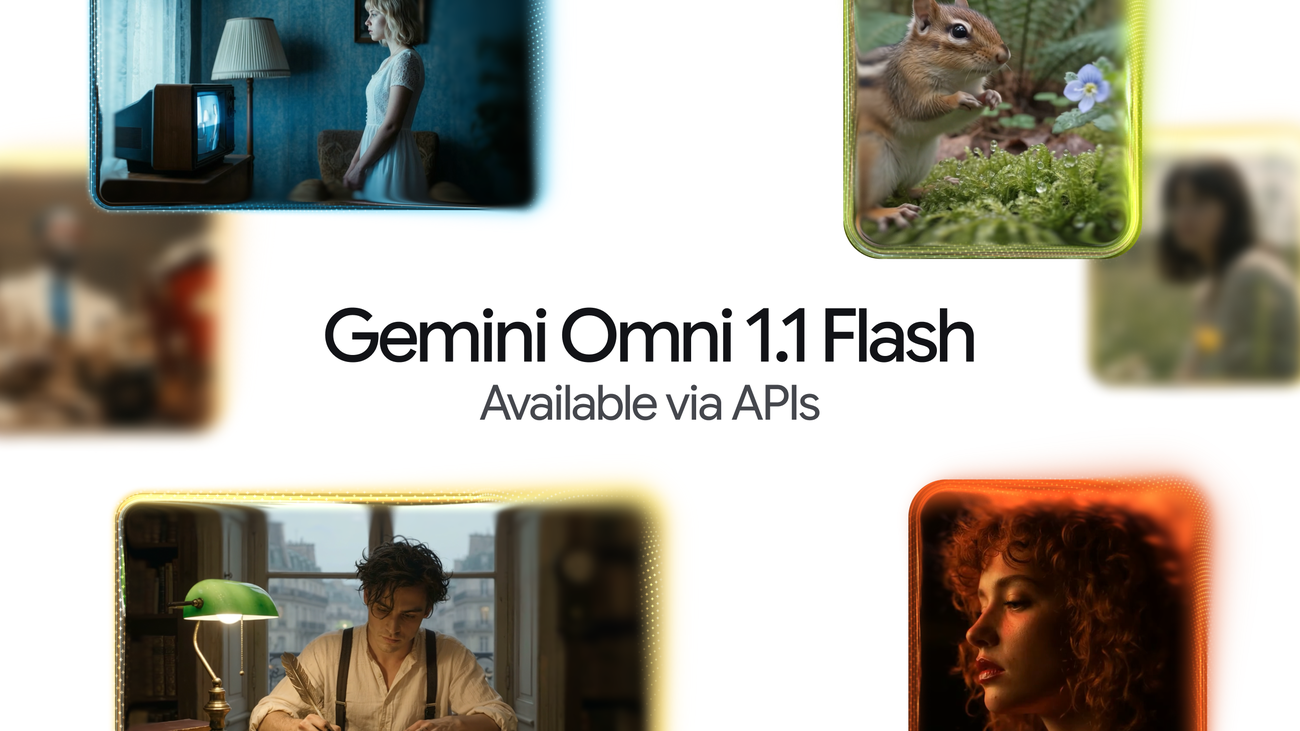
Gemini Omni 1.1 Flash lets you build with more control
Omni now delivers studio-quality video production, including the ability to extend a scene, first and last frame interpolation, crisp 4K upscaling, faster prototyping, and more.
Anish Nangia
Product Manager, Google DeepMind
Alisa Fortin
Product Manager, Google DeepMind
Listen to article
[[duration]] minutes
This content is generated by Google AI. Generative AI is experimental
Today, we’re introducing Gemini Omni 1.1 Flash, a new suite of creative controls and generative video capabilities to support developers. Gemini Omni brought real-world reasoning to generative creation, and today’s updates make Omni 1.1 production-ready for professional use via the Gemini API in Google AI Studio.
Whether you’re building generative video workflows, creative tools, or media editing software, these updates make generative video more controllable, faster to iterate on, and polished for real-world deployment. Here’s a look at what’s new:
Extend scenes for longer storytelling
Scene extension allows you to take an existing video and continue generating footage seamlessly from where it left off.
With Omni 1.1, the model can now analyze up to 10 seconds of prior context — a leap from previous models that only referenced the final second. The result is improved visual consistency and narrative adherence, letting you build longer stories or branch into new creative directions. You can extend videos in 10-second increments up to a total cumulative length of 40 seconds.
Here’s how you can extend your scene with the Gemini API:
from google import genai client = genai.Client() interaction = client.interactions.create( model="gemini-omni-1.1-flash", previous_interaction_id=previous_video_interaction.id, input=[ {"type": "text", "text": "Continue the scene."} ], response_format={ "resolution": "360p", }, )Specify first and last frames
Achieve smooth transitions and camera movements by specifying the starting and ending frames of a shot. Omni 1.1 generates continuous video between two keyframes, making it ideal for complex camera orbits, zoom transitions, or seamless looping clips.
Prompt 1: A close-up low-angle shot of a stylish drummer in a beige suit playing a red drum kit in a grand hall transitions as the camera whip-pans to the side, revealing an older saxophonist playing alongside a ballet dancer spinning in a white outfit under soft purple stage lights. One continuous shot, no jump cuts.
Prompt 2: The camera zooms into the TV screen, where we see the same woman and the same scene from the beginning. Seamless video. One continuous shot, no jump cuts.
Draft videos more efficiently in 360p
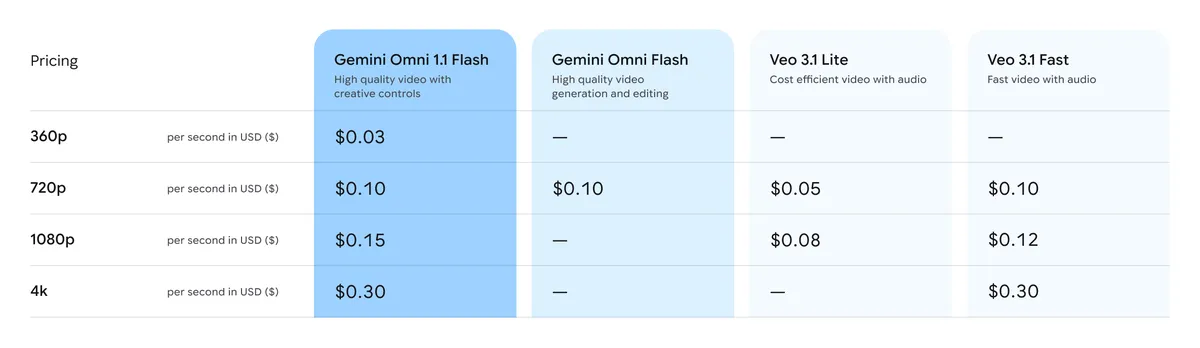
Generate lightweight previews in 360p resolution up to 60% faster* and at a third of the cost compared to Omni 1.1’s standard 720p resolution. This is helpful for rapid prototyping, storyboard iteration, and quick rendering in developer platforms.
*Up to 60% faster generation based on system throughput of 360p vs. 720p resolution
Prompt: A microscopic view of iridescent marine diatoms, displaying intricate, glass-like silica shells with breathtaking natural symmetry. The colors range from deep volcanic amber and warm copper to vibrant turquoise and violet, mimicking the rich palette of earth and ocean. Tiny, delicate structures glow softly against a clean dark field background. High-fidelity scientific imaging, sharp details, organic textures, micro-photography. Maintain the microscope lens effect throughout the entire video.
Upscale up to 4K resolution
Generate polished, high-resolution 1080p or 4K outputs that are ready for professional production with Omni 1.1.
Prompt 1: Fish swimming, tracking shot
Prompt 2: A little chipmunk darting out of the woods from the left side of the screen and sniffing the air inquisitively before darting out of frame on the right side
Prompt 3: Cinematic macro close-up of vibrant golden-orange Japanese maple leaves on a delicate branch, gently rustling and swaying in a soft, rhythmic autumn breeze. Sunlight filters through the translucent foliage, creating a warm, glowing effect. Shallow depth of field, dreamy bokeh background, hyper-detailed textures, photorealistic, 4k.
Add video references in your multimodal input
Reference up to three seconds of video when crafting your scene, allowing you to maintain visual context and character consistency based on video references.
Prompt: Use the three uploaded videos of dancers and replace them with the provided characters. Have them perform their individual dances from the reference videos, all together in the large, open space from the provided image.
The dog character dog.png should do the classical dance from dance3.mp4. The octopus octo.png should do the hip hop dance from dance1.mp4, and the bear bear.png should do the breakdance from dance2.mp4. The final result should be one continuous shot with no scene cuts.
Inspiring concepts for what you can build
Here are a few ideas showing how developers can put these new capabilities into action across custom tools and creative workflows.
See how customers are putting Omni Flash in production
Our customers are already driving real-world production with Gemini Omni Flash via the Agent Platform API. Explore the videos they’ve created and hear about how they are using the model below.
Build with Gemini Omni 1.1 Flash Today
Pricing table for Gemini Omni 1.1 Flash.
Omni 1.1 is rolling out across the Google developer ecosystem:
- Start building in Google AI Studio: Try out Omni 1.1 directly in Google AI Studio.
- Build on Gemini Enterprise Agent Platform: Enterprises can build with Omni 1.1 directly via Agent Platform API.
- Explore the developer documentation: Check out the official documentation, the cookbook and prompting guides to learn how to integrate scene extensions, video references, and upscaling into your applications.
Omni 1.1 is also available to all Google AI Plus, Pro and Ultra subscribers globally in Google Flow, starting today. Scene extension is available to all Google AI Plus, Pro and Ultra subscribers globally in the Gemini app.
Get the latest news from Google in your inbox
Sign up for our newsletters with product updates, event information, special offers, and more.
Your information will be used in accordance with Google’s privacy policy. You may opt out at any time.
-
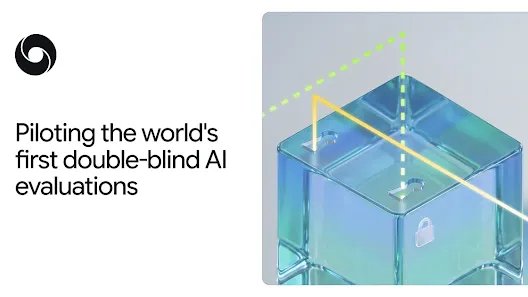
Piloting the world’s first double-blind AI evaluations
August 27, 2026 Responsibility & Safety
William Isaac, Sol Messing and Kristian Lum
Building trust in proprietary model benchmarks using cryptographically secure environments
Imagine a student is set to take a high-stakes exam. If they accidentally peek at the test questions in advance, achieving a perfect score is influenced by this knowledge, making it a meaningless accomplishment. To truly measure what they know, they must have no visibility of the test questions until it’s time to take the exam. That is the exact challenge the industry faces when evaluating advanced AI models. If a model has already seen the test questions – a problem known as benchmark contamination – the results can only be trusted to an extent.
Today, we’re introducing the world’s first double-blind evaluation of a proprietary, frontier class AI model, which keeps external evaluations confined to a cryptographic “box” where they can’t be used by models later to optimize performance ahead of testing. We’re partnering with the Singapore AI Safety Institute, OpenMined, AVERI, and MLCommons, to test a Gemini Flash Lite model against confidential benchmarks in a privacy-preserving environment, increasing evaluation integrity.
At Google, we assess our AI systems using a broad spectrum of evaluations throughout model development and deployment, but we don’t rely on internal testing alone. To identify potential blindspots, we work with a diverse group of external partners, including specialized research labs, civil society and national AI Safety and Security Institutes (AISIs), using their unique expertise to stress-test our models.
As AI models become more capable, ensuring the model has not seen the test questions or prompts in advance is critical, as this can skew the results. Policymakers, researchers, and enterprises need to trust that AI benchmarks accurately reflect a model’s true capabilities and safety, but if models are able to “peek” at the evaluation questions in advance, it can artificially inflate scores and undermine this trust.
Although zero-logging protocols and rigorous contractual safeguards have long kept external test prompts confidential, incorporating technical and cryptographic safeguards marks a major step forward in secure model evaluation.
How double-blind evaluations work
-
Better answers, broader thinking: What students gain from ChatGPT and critical-thinking training
A randomized study of more than 1,000 students examines ChatGPT, critical thinking, originality, and student performance on a real-world university assignment.
-
Expanding OpenAI’s presence in Brazil
OpenAI is expanding its presence in Brazil, deepening engagement with developers, businesses, and communities to support AI adoption across the country.
-
Intelligent transcription with Gemini 3.5 Transcribe
Our latest speech-to-text model designed for precise and intelligent real-time transcription.
Diego Melendo Casado
Senior Director, Engineering, Gemini Audio
Luke Leonhard
Chief of Staff, Gemini Audio, on behalf of Gemini Audio Team
Listen to article
[[duration]] minutes
This content is generated by Google AI. Generative AI is experimental
Today, we’re introducing Gemini 3.5 Transcribe, our most precise speech-to-text model yet, designed for intelligent voice interactions. Unlike conventional speech recognition models that struggle with background noise, complex jargon, and disfluency cleanup, Gemini 3.5 Transcribe converts raw audio directly into accurate, polished, formatted text.
Across our products like the Gemini app and on Android, we’ve seen consumers already benefiting from this transcription model with new voice capabilities like Rambler on Android and in the Gemini app on macOS. Now, developers can build similar capabilities with Gemini 3.5 Transcribe in the Gemini API in Google AI Studio and Gemini Enterprise Agent Platform.
We’ve built 3.5 Transcribe to plug seamlessly into your developer workflows, whether you’re building voice agents, real-time captioning tools, or post-call analytics pipelines. The model is available across two separate APIs:
- Real-time streaming: Delivers continuous, bidirectional streaming with sub-second latency for interactive voice apps via the Live API using
gemini-3.5-transcribe-live. - Pre-recorded audio processing: Transcribes recorded audio, meetings, call logs, and more with speaker attribution and word-level timestamps via the Interactions API using
gemini-3.5-transcribe.
Get more precise and intelligent transcription
Gemini 3.5 Transcribe is designed to capture your natural speaking style to better understand your intent and recognize custom vocabulary, so you can execute tasks with your voice.
- Smart transcription: Seamlessly handles self-corrections (like “let’s meet Tuesday—no, Wednesday”), removes filler words (“ums” and ‘“ahs”), auto-formats your text.
- Function calling: The model can delegate complex tasks (such as image generation and file analysis) to other Gemini models via function calls. Currently available in the Gemini macOS app.
- More precise transcription: As measured by Artificial Analysis, achieves an average Word Error Rate (WER) of 4.0% for streaming and 2.6% for non-streaming use-cases. It shows strong performance across noisy, real-world environments, accurately capturing alphanumeric entities like postal codes and order IDs.
- Custom vocabulary: Recognizes specialized jargon and unique spellings by seamlessly adapting transcriptions to your provided custom vocabulary.
- Global language support: Automatically detects and transcribes over 85 languages, seamlessly handling regional accents and diverse dialects.
- Multi-speaker identification: Accurately attributes speech in pre-recorded audio with timestamps for up to three speakers (support for 3+ speakers is experimental).
Gemini 3.5 Transcribe’s performance represents a major advancement from our previous transcription model, Chirp 3, offering new capabilities, improved word error rates, and significantly better latency. As measured by Artificial Analysis, time to final transcription, for example, improves by 70%. On the FLEURS benchmark across a set of top languages and locales, the model delivers precise multilingual performance, improving over Chirp 3, and achieving a 5.50% WER in streaming mode and 5.04% WER in non-streaming use-cases.
Experience smart transcription and advanced dictation
In addition to the Gemini API in the Google AI Studio and Gemini Enterprise Agent Platform, 3.5 Transcribe goes further than standard speech-to-text to make working across Google feel more natural and intuitive. By bringing context-aware understanding directly into everyday surfaces like Gboard, Antigravity, the Gemini app, and Chrome, it captures nuances, intent, and inline edits with ease.
- On Gboard on Android, through the new Rambler feature, 3.5 Transcribe transforms spoken thoughts into well-formatted text, filtering out filler words. You can also use your voice to make edits, correct misspellings, and change the writing style.
- On Google Antigravity, 3.5 Transcribe pairs screen context and chat history, with your permission, to ensure pinpoint transcription accuracy across file names, agent thoughts, and active documents.
- In Google AI Studio, you can access 3.5 Transcribe in Build mode to vibe code apps with your voice on the fly.
- In the Gemini app on macOS, 3.5 Transcribe not only transcribes your free natural speech into clean formatted text, but also enables voice commands that can pair seamlessly with screen context to power complex workflows. By calling on other Gemini models in the background to handle the heavy lifting, the model makes it effortless to summarize local files, repurpose text across apps, or generate images right at your cursor—using just your voice.
- Coming soon to Chrome, you’ll be able to talk to type in any web field — making it effortless to dictate replies, draft posts, or prompt Gemini in Chrome more naturally and easily with your voice.
Read the early reviews
By leveraging the Gemini Live API, developer platforms such as Agora, Fishjam, LangChain, LiveKit, Pipecat, Vercel, and Vision Agents enable developers to build and deploy high-performance voice-driven interfaces with ease. These platforms manage complex real-time media streaming infrastructure behind the scenes, allowing developers to focus entirely on crafting the user experience.
Companies like vivo, Intellitek Health, and Lingopal have also shared positive feedback on 3.5 Transcribe, highlighting its impressive latency, accuracy, and expansive language support.



Start using 3.5 Transcribe today
- For developers: In public preview in the Gemini API via Google AI Studio and Google Antigravity.
- For enterprises: In public preview via Gemini Enterprise Agent Platform and coming soon to Gemini Enterprise for Customer Experience.
- For everyone: In Gemini app on macOS in English, Rambler on Android in select countries and languages, and coming soon to Chrome.
Get the latest news from Google in your inbox
Sign up for our newsletters with product updates, event information, special offers, and more.
Your information will be used in accordance with Google’s privacy policy. You may opt out at any time.
- Real-time streaming: Delivers continuous, bidirectional streaming with sub-second latency for interactive voice apps via the Live API using
-
Bringing ChatGPT for Teachers to more U.S. school districts
ChatGPT for Teachers is expanding to 55 U.S. school systems, bringing secure AI tools, training, and support to over 100,000 more educators and staff.