
Every AI provider comes with models of varying strengths. I’m a Claude stan because it just gets my writing style. But for some tasks, Claude’s lineup doesn’t cut it at all—when I need to process data at scale, for example, I might reach for Gemini. When I need a versatile generalist for classification or routing, GPT might be my pick. Other people across my team and at Zapier have altogether different preferences, which tend to change with every new model release.
If your stack is built around a single AI provider, you’re limiting your team to that vendor’s lineup—and cutting off access to models that might actually suit certain tasks better.
With Zapier, you get flexibility. You can use whichever AI models you want, from whichever providers you want, and mix and match them in the same workflow depending on the task. You can set that up from the AI tool you already use, like Claude or ChatGPT, or build it directly in Zapier, and either way it becomes a Zap that keeps running after the chat closes. Below, I’ll break down why that matters and how to build resilient workflows no matter which AI tools your team prefers.
Build automations from wherever you work. Describe the outcome you want, and Zapier connects your tools, runs the steps, and stays on the job after you close the chat. Combine AI with reliable, deterministic automation across 10,000+ apps. Get started for free.
Table of contents:
What is AI model flexibility?
When an automation platform like Zapier provides AI model flexibility, it means you can use any AI model within your workflows (or access your tools from any AI assistant) and swap AI models at any time, without committing to a single provider.
That flexibility matters. No one model dominates at everything, and their relative strengths can shift with every release cycle. So if you’ve built your workflows around one provider and the pricing, quality, or policies shift—or one model just leapfrogs another—you’re stuck rebuilding.
With an interoperable platform, you can maintain an ever-evolving roster of models, and everyone gets to use what they want. Your marketing team might go with Claude to draft long-form content, while Sales uses GPT to summarize call transcripts, and Support routes tickets through Gemini for multilingual triage. Nobody has to compromise.
Even within a single team, preferences can split. It’s like cooking in my household. I can’t imagine prepping meat with anything but a Santoku knife, while my boyfriend—whose whole MO is speed—tends to reach for kitchen scissors. Same task, different tool. Similarly, one marketer might draft campaigns in Claude, while another prefers GPT for faster iteration.
On Zapier, you can pick the right model for each step of a Zap, and swap models in seconds if something better comes along. And there’s no need to rebuild a thing.
When you configure AI by Zapier, for example—our built-in tool for adding AI steps to your Zaps—you can quickly connect your preferred model. If you want to change the model, just tell your agent or Zapier Copilot to switch it, and that’s that.
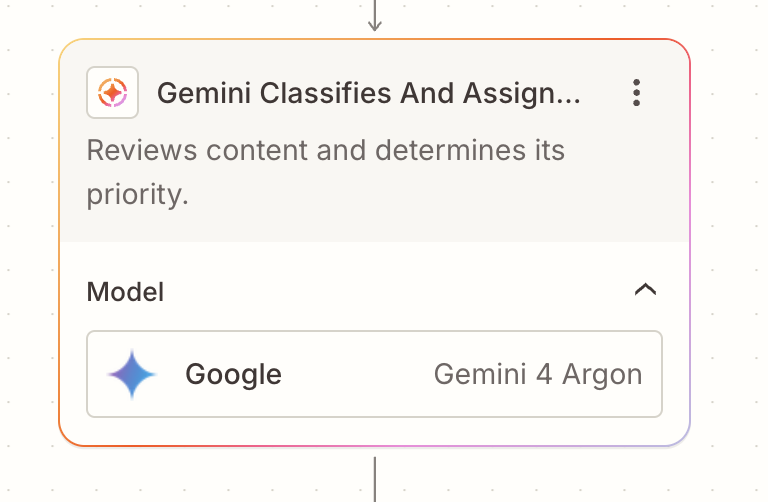
In addition to AI by Zapier, you also have the option to use a direct AI integration. That’s best if you want access to more niche providers and legacy models.
The cost of building on a single AI vendor
Some AI vendors are expanding into full platforms. That only deepens the lock-in if you go all in on one AI platform. When you build directly on one provider without a shared platform underneath, you can run into real problems:
-
Lack of flexibility. When something changes—pricing shifts, a model gets deprecated, a competitor leaps ahead—you can’t switch to the best option.
-
Maintenance issues. Shiny new models launch all the time. If, with every improvement, you need to evaluate whether to rip out and replace your current setup, your team will spend more time managing transitions than actually using AI to get work done. Every custom connection you build between your tools and one specific provider is a liability. Those integrations need maintenance. They break when APIs change. And they make it exponentially harder to try something new, even when the new thing is clearly better. You’re wasting time your team could’ve spent advancing their AI maturity.
-
Organizational silos and disconnect. When there’s no shared infrastructure, departments pick their own AI tools independently. You end up with disconnected workflows, duplicate data, and no shared view of how AI is actually being used across the organization. Leadership can’t see the full picture, teams can’t learn from each other’s setups, and everyone’s reinventing the wheel in their own silo.
All this risk can accumulate at the decision-making level. If your AI pilots never actually reach production, it’s likely that’s for these very reasons.
How to utilize Zapier’s AI model flexibility
The best way to understand the value of model-agnostic workflows starts with seeing it in practice. You can use AI models across your workflows in two main ways on Zapier: for one-off tasks from your AI agent or for repeated tasks that run the same way every time.
One-off tasks
Maybe your marketing team works out of Claude, or your ops team runs everything through ChatGPT. Install Zapier in whichever AI tool they rely on, and it doesn’t matter which one it is. They can all take action across your business apps from wherever they work, and because the connection lives in Zapier, trying the next AI tool doesn’t mean starting over.
Zapier handles each app’s login, so your AI tool never gets your credentials, and you can turn off its access in one place. That connection reaches 10,000+ apps, so your team can do things like send Slack messages, update CRM records, create calendar events, or trigger entire workflows—all from a natural-language conversation in their chat window.
Repeated workflows
You can also build repeatable workflows directly from your AI assistant. Describe what should happen, and your agent will draft a Zap, an automated workflow that runs on its own. It can start on a schedule or when something happens in your apps, and it follows traditional if/then steps—so given the same data, it runs the same way every time.
You can add an AI step inside the workflow (using AI by Zapier) to take care of interpretation, handle ambiguity, or generate content—then send that result back to a logic-based, if-this-then-that step that gets the output reliably where it needs to go. That’s a different strength from scheduled tasks inside AI tools like Claude or ChatGPT, which are probabilistic (the same prompt can return different results).
AI by Zapier lets you choose from dozens of models from OpenAI, Anthropic, Google, and more, with no separate account needed. Instead of worrying about token billing, you’ll just use Zapier tasks. Let’s look at a few different use cases that take advantage of different AI models’ strengths. And because these are built on Zapier, swapping any model takes minutes and breaks nothing.
First, you can take a webinar transcript and automatically turn it into a blog draft and social posts. Use Claude for the blog draft since its writing tends to read more naturally. Then route social copy through ChatGPT, which excels as a versatile, conversational generalist. If a new model outperforms either one next month, swap it in without touching the rest of the Zap.
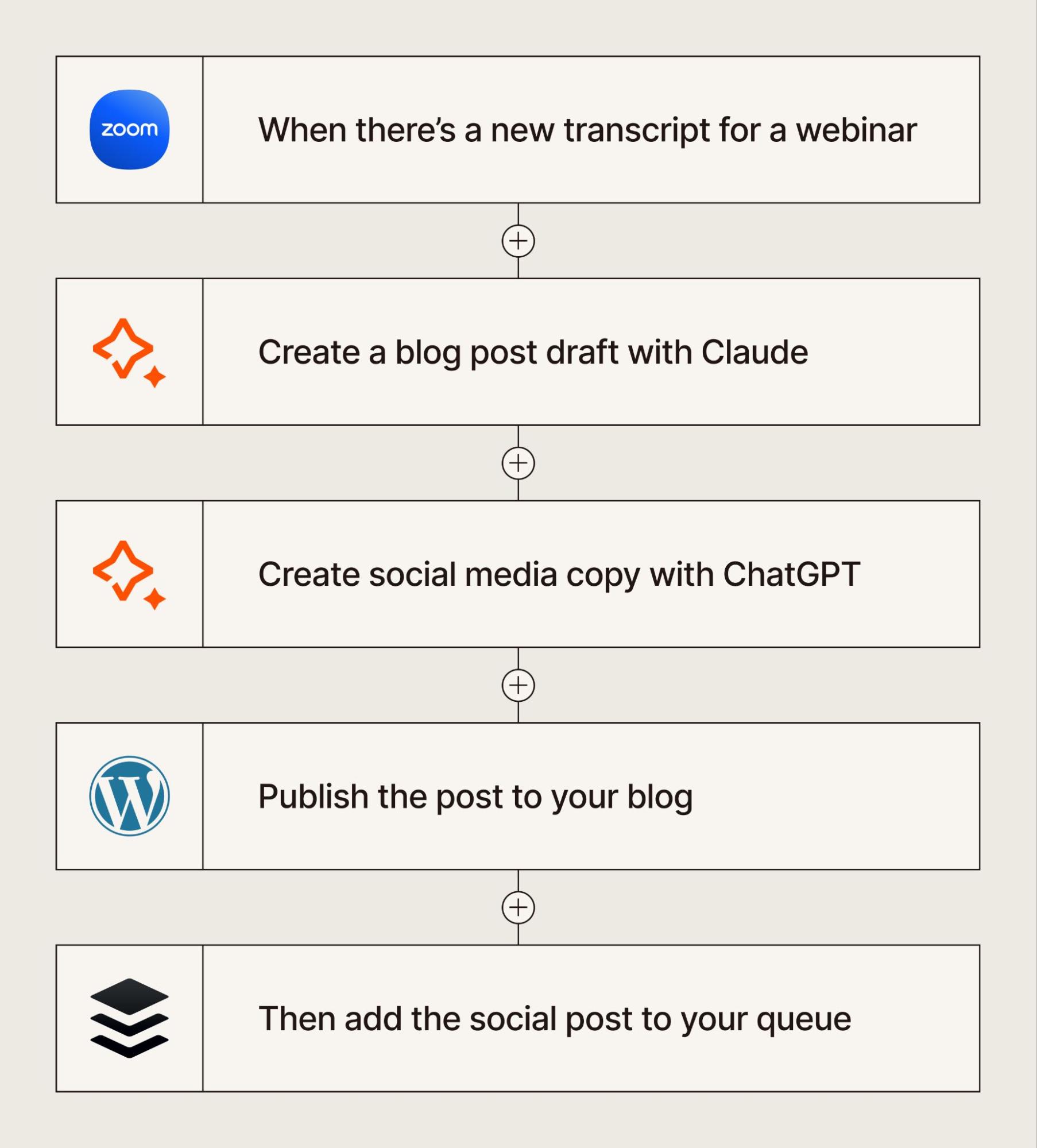
Pro tip: Want to expand this Zap? Try adding steps to save drafts to your file storage app, or insert Human in the Loop steps to manually check drafts before scheduling them.
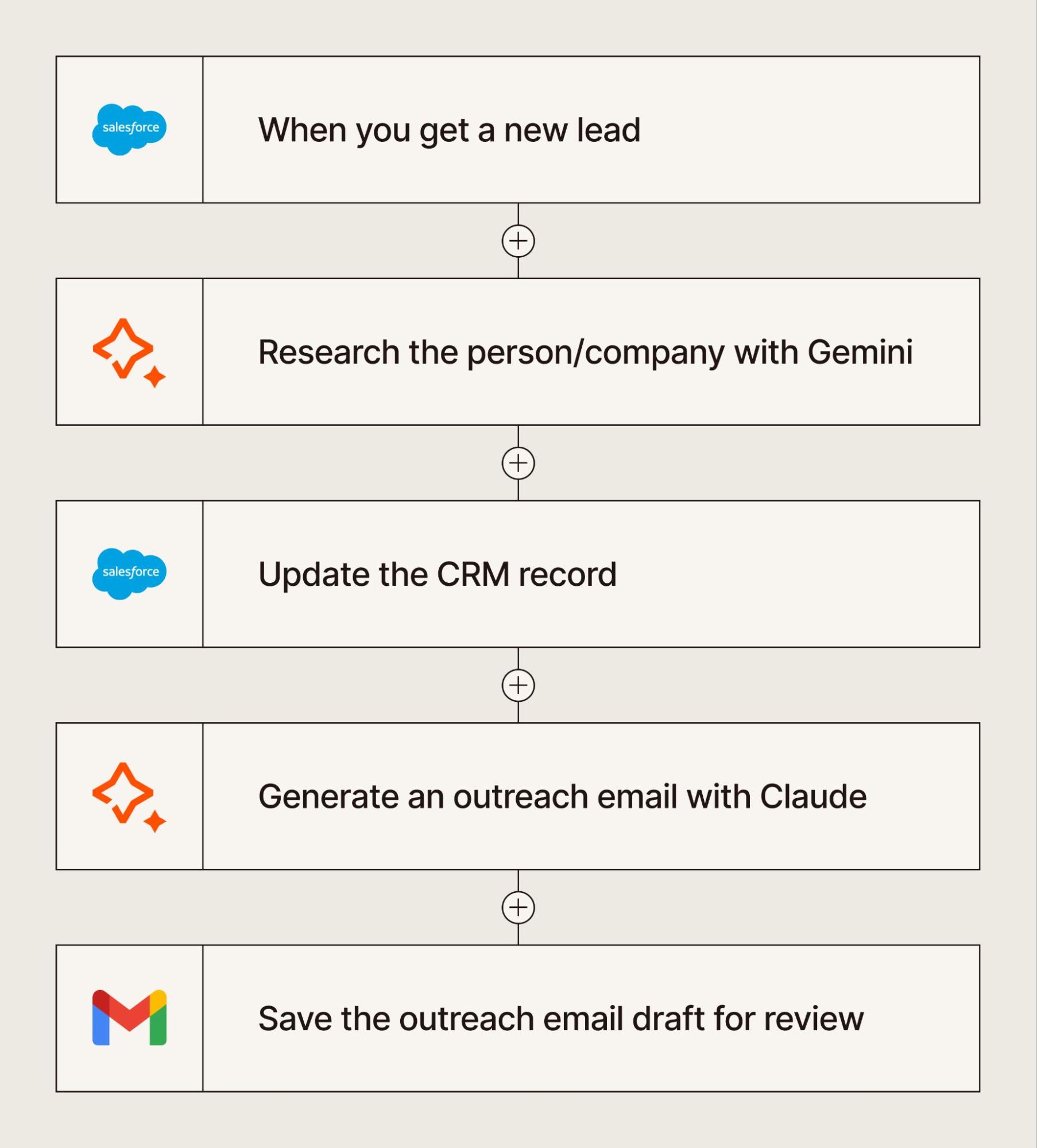
Or, say your sales team wants to use AI-powered automation to manage leads. When a new lead enters your CRM, enrich their profile with an AI-generated company summary, then draft a personalized outreach email. Gemini’s massive context window makes it ideal for digesting lengthy company reports or earnings calls in one pass, while Claude can handle the nuanced, friendly outreach email. Each model does what it’s best at—within the same Zap.
Operations teams can use Zapier to classify incoming support tickets by urgency, summarize them, and route them to the right queue—all automatically. ChatGPT’s versatility makes it a solid default for classification and routing. For enterprises with strict compliance requirements, Azure OpenAI offers the same models wrapped in Microsoft’s enterprise-grade security, so regulated industries can automate without compromising on data protection.
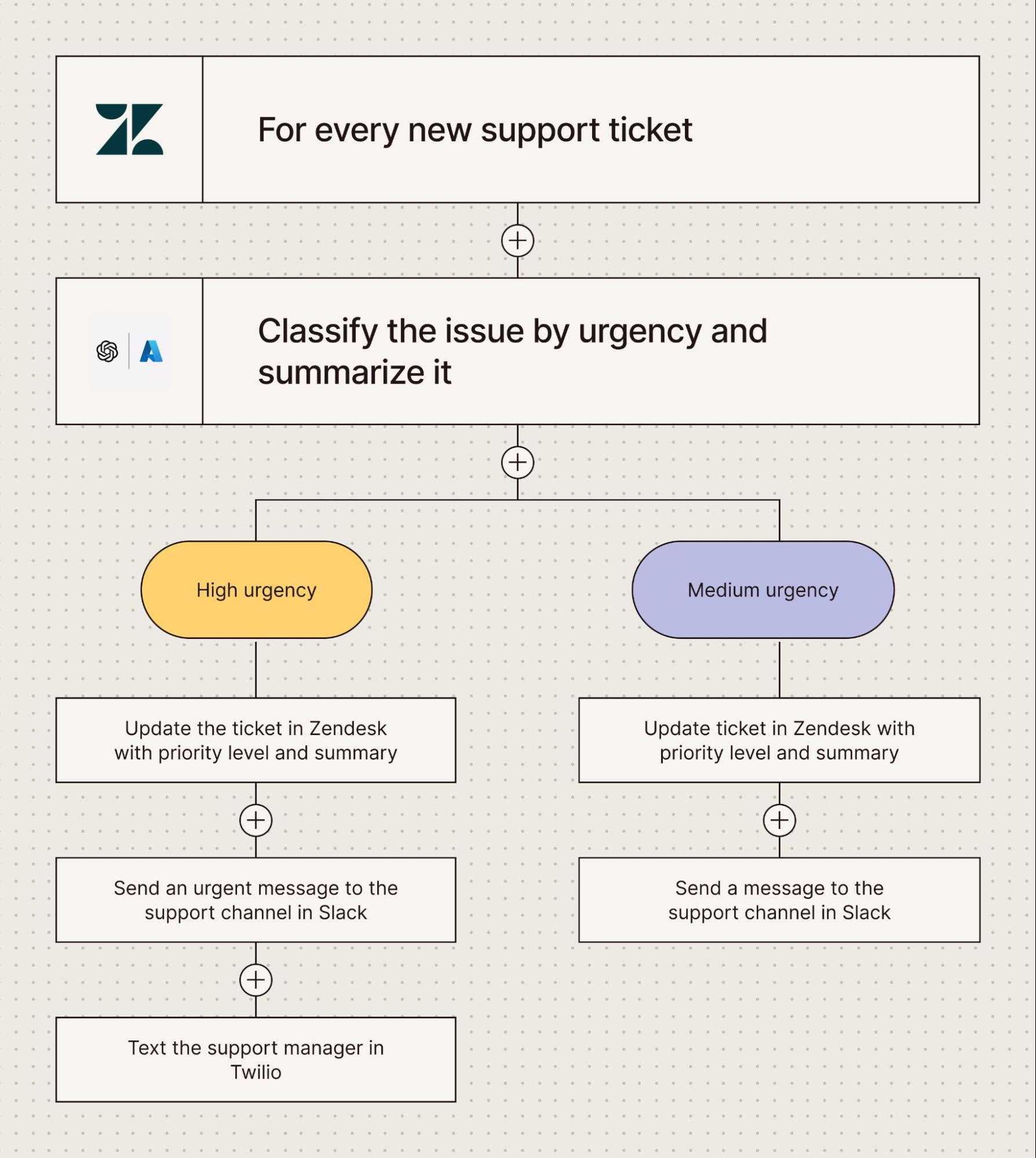
Pro tip: In this Zap, you can easily swap the Azure OpenAI step for AI by Zapier to add flexibility. AI by Zapier lets you switch models in a single click without re-authenticating and includes a built-in prompt optimizer to sharpen your results. But if your IT team requires strict data residency or custom content filtering, the direct integration is the way to go—it ensures all your data remains securely within your company’s private Azure Tenant.
AI models you can build with on Zapier
With AI by Zapier, you have built-in access to dozens of the latest models from OpenAI (GPT), Anthropic (Claude), Google (Gemini), Moonshot AI (Kimi), Z.ai (GLM), Meta (Muse Spark), Azure OpenAI, and Amazon Bedrock. AI by Zapier also lets you bring your own key (BYOK) for a wider set of model options. Or, you can use one of Zapier’s hundreds of direct integrations with AI providers to get access to even more niche models and open-weight providers like DeepSeek. Learn more about the AI models on Zapier and how to access them.
And if you’re having trouble deciding which model to use in your workflows, check Zapier’s AutomationBench rankings. Every time a new major AI model is released, Zapier runs it through this benchmark to see how it performs on real business workflows compared to other available models.
Practical guidance for building resilient AI workflows
A few principles will keep your AI workflows resilient no matter what shifts in the model landscape.
-
Map the workflow first, not the model. Define what needs to happen in your workflow first. Map out your trigger, any actions that follow, and the destination. Don’t worry about picking an AI model until you’ve nailed the workflow logic.
-
Start with one high-impact AI workflow. Don’t try to build a mega-Zap that automates everything at once. Pick one workflow where AI will save you the most time or have the most visible impact, build it well, and prove the value. That success will become your case study for expanding.
-
Reuse successful workflows. Once you’ve proven the success of a Zap, turn it into a template that other teams can adopt. This is one of the most underused advantages of building on Zapier—when someone on your team builds a killer automation, everyone can take advantage of it.
Build AI workflows that outlast any single model
AI will keep shifting. New models will keep launching. The providers you’re evaluating today might look totally different a year from now. Going all in on any single model or a single provider is a bet that won’t age well.
The more durable strategy is investing in an interoperable platform: one that lets you plug in the best models for each job, swap them when something better arrives, and scale AI across your organization without breaking what already works.
That’s what Zapier provides. Not a bet on one model, but a platform that lets you experiment, adapt, and grow with AI on your own terms. Install Zapier in your AI assistant and ask it to build your first model-agnostic Zap, or build one directly in Zapier.
Related reading:
This article was originally published in March 2026. The most recent update, with contributions from Nicole Replogle, was in November 2026.